

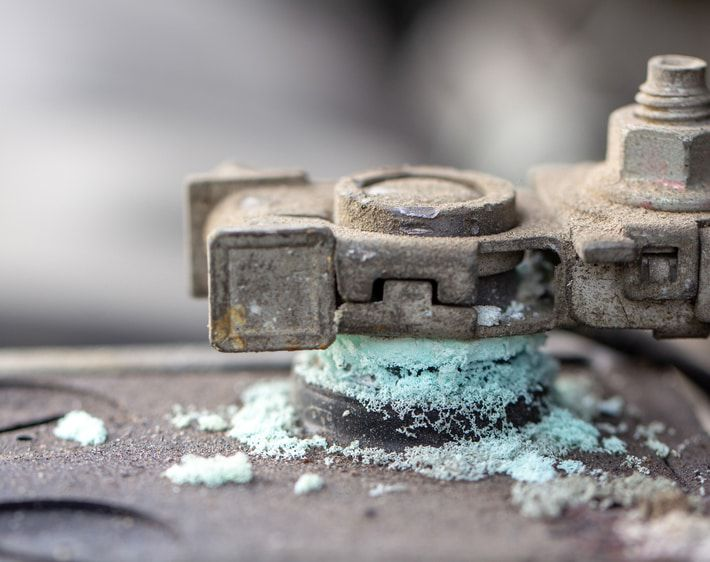
If your car won’t start, and you see a powdery white, blue, or green substance around the battery terminals, you’re not alone. Corroded battery terminals are a common problem that can prevent your car from starting and hinder its overall electrical performance. The good news is, it’s a simple fix you can do yourself.
Therefore, this guide will walk you through the causes of corrosion, a step-by-step cleaning process, and how to prevent it from coming back, helping you restore your car’s reliable starting power.
What Causes Battery Corrosion?
The crusty buildup on your battery terminals is a byproduct of a normal chemical reaction. Automotive batteries contain sulfuric acid, which releases hydrogen gas as the battery charges and discharges. This gas can leak through small cracks in the battery casing or around the terminal posts. Consequently, when the hydrogen gas reacts with the metal of the terminals and the ambient air, it forms the white or bluish-green powder you see.
- Corrosion on the Negative Terminal: This often indicates that the battery is being undercharged. For example, this can happen if you primarily take short trips, which don’t give your alternator enough time to fully recharge the battery.
- Corrosion on the Positive Terminal: On the other hand, this is typically a sign of overcharging. It’s less common and can signal a problem with your car’s charging system, such as a faulty alternator.
How to Clean Corroded Battery Terminals and Cables
If the corrosion isn’t too severe, you can clean it yourself. To begin, gather the following tools and supplies:
- A wire brush or a dedicated battery terminal cleaner
- Sandpaper or a specialized battery post cleaning tool
- Baking soda and warm water
- Gloves and safety glasses
- A corrosion prevention spray or terminal protector
Step-by-Step Cleaning Process
- Safety First: First and foremost, make sure your vehicle is off. Wear gloves and safety glasses to protect your hands and eyes from the acidic residue.
- Disconnect the Battery: Always disconnect the negative cable first, followed by the positive cable. This is because it minimizes the risk of a short circuit.
- Neutralize the Acid: Next, mix a small amount of baking soda with warm water to create a paste. Apply this paste directly to the corroded areas on both the terminals and the cable ends. The baking soda will bubble as it neutralizes the acid.
- Scrub and Clean: Once the bubbling stops, use your wire brush or cleaning tool to scrub away the remaining corrosion. A specialized battery post cleaning tool can effectively clean both the post and the inside of the cable clamp.
- Rinse and Dry: Finally, use a small amount of clean water to rinse off the baking soda mixture. Be sure to dry everything thoroughly with a clean rag or towel, as any remaining moisture can accelerate future corrosion.
When to Replace the Battery Instead
Sometimes, corrosion is a symptom of a larger problem. For this reason, you should consider replacing your battery if you notice any of the following signs of damage:
- The battery case is swollen, cracked, or leaking.
- The battery is more than 3-5 years old and shows signs of weak performance.
- The corrosion is so severe that it has eaten away at the terminals or cable clamps, making a secure connection impossible.
If you need a new battery, we offer a wide selection with fast shipping and expert support:
- Car & Truck Batteries
- Motorcycle Batteries
- Lawn Mower Batteries
- Power Sport Batteries
- Deep Cycle & Marine Batteries
How to Prevent Future Corrosion
Once your terminals are clean, take a few simple steps to prevent corrosion from returning.
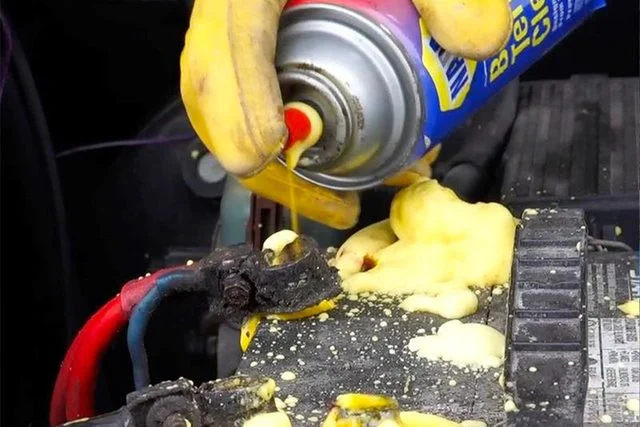
- Use a Corrosion Prevention Spray: After you’ve cleaned and dried the terminals, apply a thin layer of Battery Terminal Protector Spray. This product creates a seal that shields the connection from moisture, salt, and acid vapors.
- Install Protective Felt Washers: For an extra layer of protection, use Battery Terminal Felt Washers. These are specially treated pads that fit over the battery posts and help block corrosion before it starts.
- Keep Your Battery Charged: Corrosion can be a sign of an undercharged battery. If you frequently take short trips or leave your car parked for extended periods, consider using a battery maintainer or smart charger. Products like the Battery Tender Junior 12V Charger will keep your battery at an optimal charge without overcharging it, extending its life and preventing potential corrosion.
Final Thoughts
Ultimately, corroded battery terminals don’t have to be a major roadblock. By understanding what causes the problem and taking a few simple steps to clean and protect your battery, you can ensure your vehicle starts reliably every time. Regular maintenance can save you time, money, and the frustration of being stranded by a dead battery.
If you have any questions or need help finding the right maintenance products, our expert team at BatteryMart.com is always here to help.
